
Mac
Deploy with an MDM
MSG Converter supports managed preferences — the standard macOS mechanism Jamf, Intune, and other MDMs use to pre-configure or lock down settings across your fleet.
How it works
Every setting in MSG Converter's Options window has a standard macOS preference key. When your MDM pushes a Forced preference for one of these keys, MSG Converter automatically:
- Uses that value instead of whatever the user has set
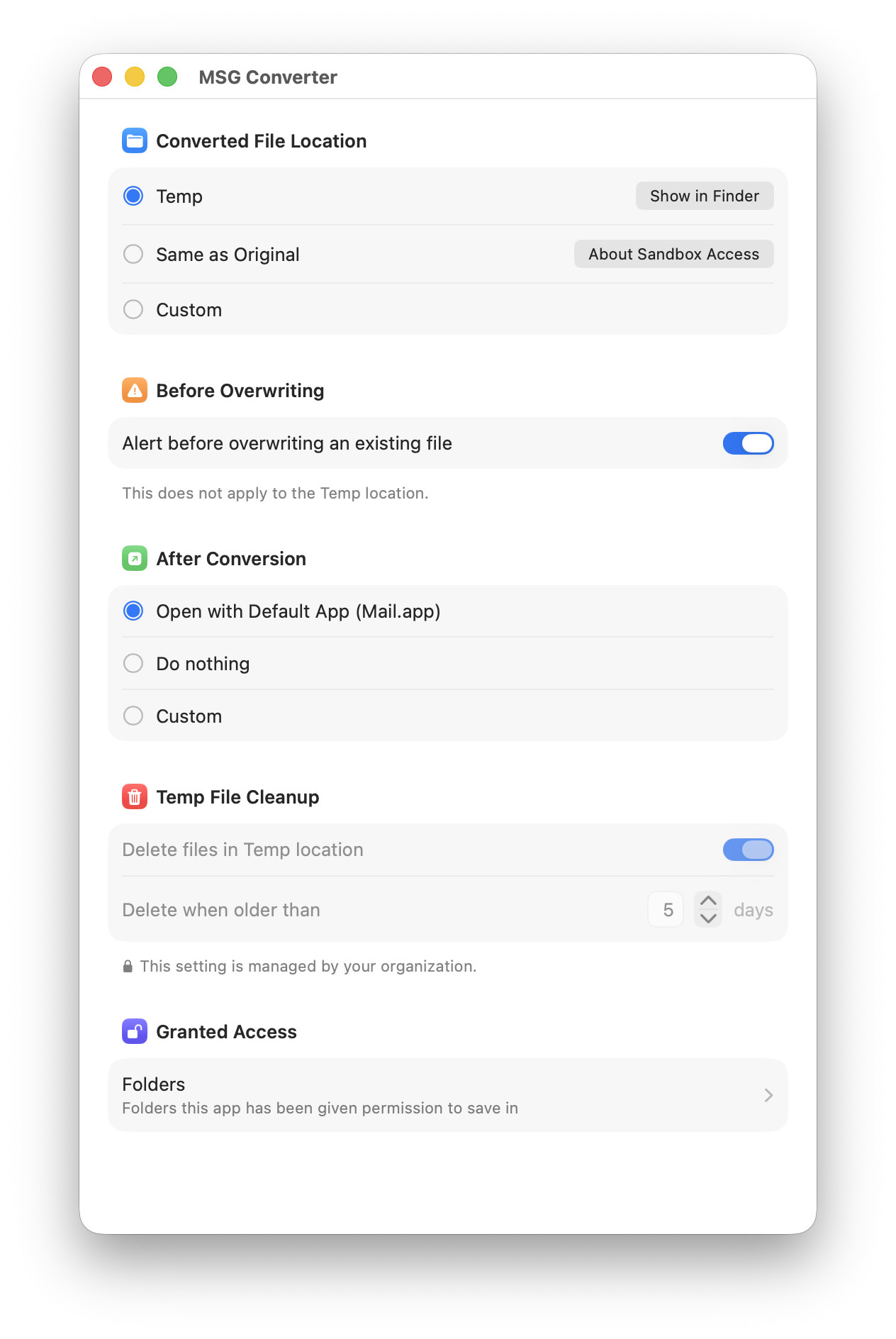
- Grays out and disables the corresponding control in the Options window
- Shows a small note explaining the setting is managed by your organization
Users can still see the setting, but can't change it while it's forced. If you force only some keys in a section, only the controls tied to those specific keys are locked — everything else stays fully editable.
Supported preference keys
You can force any subset of these keys — you don't need to set all of them.
| Key | Type | Allowed values | Controls |
|---|---|---|---|
SaveLocation |
String | Temp, Same, Custom |
Where converted .eml files are saved |
CustomSaveLocationPath |
String | Absolute folder path | The specific folder used when SaveLocation is Custom |
AlertBeforeOverwrite |
Boolean | true / false |
Whether the app asks before overwriting an existing .eml |
PostConversionAction |
String | DefaultApp, Do nothing, Custom |
What happens after a file is converted |
CustomAppPath |
String | Absolute path to an .app bundle | Which app opens the converted file when PostConversionAction is Custom |
DeleteTempFiles |
Boolean | true / false |
Whether old files in the Temp save location are automatically cleaned up |
DeleteTempFilesAfterDays |
Integer | Any positive integer | How many days old a Temp file must be before it's deleted |
Bundle identifier: net.mekani.MsgConverter
Example configuration profile
The snippet below is a ready-to-adapt .mobileconfig. Edit the values inside mcx_preference_settings to whatever you want to enforce, generate two fresh UUIDs, and deploy it as a Custom Configuration Profile.
<?xml version="1.0" encoding="UTF-8"?>
<!DOCTYPE plist PUBLIC "-//Apple//DTD PLIST 1.0//EN" "http://www.apple.com/DTDs/PropertyList-1.0.dtd">
<plist version="1.0">
<dict>
    <key>PayloadContent</key>
    <array>
        <dict>
            <key>PayloadType</key>
            <string>com.apple.ManagedClient.preferences</string>
            <key>PayloadIdentifier</key>
            <string>net.mekani.MsgConverter.managed</string>
            <key>PayloadUUID</key>
            <string>06B03EED-3010-4562-8B99-2D38F9FB28B1</string>
            <key>PayloadVersion</key>
            <integer>1</integer>
            <key>PayloadEnabled</key>
            <true/>
            <key>PayloadDisplayName</key>
            <string>MSG Converter - Managed Defaults</string>
            <key>PayloadContent</key>
            <dict>
                <key>net.mekani.MsgConverter</key>
                <dict>
                    <key>Forced</key>
                    <array>
                        <dict>
                            <key>mcx_preference_settings</key>
                            <dict>
                                <key>SaveLocation</key>
                                <string>Temp</string>
                                <key>AlertBeforeOverwrite</key>
                                <true/>
                                <key>DeleteTempFiles</key>
                                <true/>
                                <key>DeleteTempFilesAfterDays</key>
                                <integer>5</integer>
                                <key>PostConversionAction</key>
                                <string>DefaultApp</string>
                            </dict>
                        </dict>
                    </array>
                </dict>
            </dict>
        </dict>
    </array>
    <key>PayloadDisplayName</key>
    <string>MSG Converter Managed Preferences</string>
    <key>PayloadIdentifier</key>
    <string>com.yourcompany.msgconverter.managedprefs</string>
    <key>PayloadRemovalDisallowed</key>
    <false/>
    <key>PayloadScope</key>
    <string>User</string>
    <key>PayloadType</key>
    <string>Configuration</string>
    <key>PayloadUUID</key>
    <string>465EB181-9F84-4EA5-943E-FF1A8F039BE4</string>
    <key>PayloadVersion</key>
    <integer>1</integer>
</dict>
</plist>
PayloadScope should stay set to User — MSG Converter's preferences live in each user's own sandbox container, not at the system level.
Deploying with Jamf Pro
- Computers → Configuration Profiles → New, and scope it to the target Smart Group.
- Add the Application & Custom Settings payload.
-
Since net.mekani.MsgConverter has no Jamf-provided settings manifest, use the External Applications tab, enter the preference domain (net.mekani.MsgConverter), and upload a plist containing just the keys you want to force, e.g.:
<?xml version="1.0" encoding="UTF-8"?>
<!DOCTYPE plist PUBLIC "-//Apple//DTD PLIST 1.0//EN" "http://www.apple.com/DTDs/PropertyList-1.0.dtd">
<plist version="1.0">
<dict>
    <key>DeleteTempFiles</key>
    <true/>
    <key>DeleteTempFilesAfterDays</key>
    <integer>5</integer>
</dict>
</plist>
Jamf wraps this into the Forced structure shown above automatically.
- Save and scope the profile.
Deploying with Microsoft Intune
Intune has no built-in editor for arbitrary macOS bundle IDs, so deploy the .mobileconfig above directly:
- Devices → macOS → Configuration profiles → Create → Templates → Custom
- Upload the .mobileconfig file (with your two UUIDs filled in and your desired keys/values set).
- Assign it to the appropriate group of Macs.
Verifying it worked
On a managed Mac, after the profile has installed, you should see the settings now restricted.
Setting defaults instead of locking them down
The Forced mechanism above always locks the control. If you just want to pre-seed sensible starting values and leave the setting fully editable, don't use a managed-preferences payload at all — write the value directly into the app's preferences with defaults write, in the target user's own context.
These are per-user, sandboxed preferences, so this has to run as that user, not as root:
defaults write net.mekani.MsgConverter SaveLocation Same
defaults write net.mekani.MsgConverter AlertBeforeOverwrite -bool true
defaults write net.mekani.MsgConverter DeleteTempFilesAfterDays -int 5
This sets the value once, same as if the user had picked it themselves in Options. Ship this as a login script or a policy/script step in your MDM (Jamf's Scripts payload, Intune's shell script policies, etc). Make sure it only runs once per user.
Questions about deploying MSG Converter in your organization?
Contact support →